Bringing Streaming to Mobile
Bringing the full broadcast experience to mobile — for creators who are on camera while they use it
Overview
The product is a live-streaming platform serving 2.5B+ monthly active users. While desktop creators had access to a full broadcast studio, mobile broadcasting was limited to landscape streaming with no chat or stream settings.
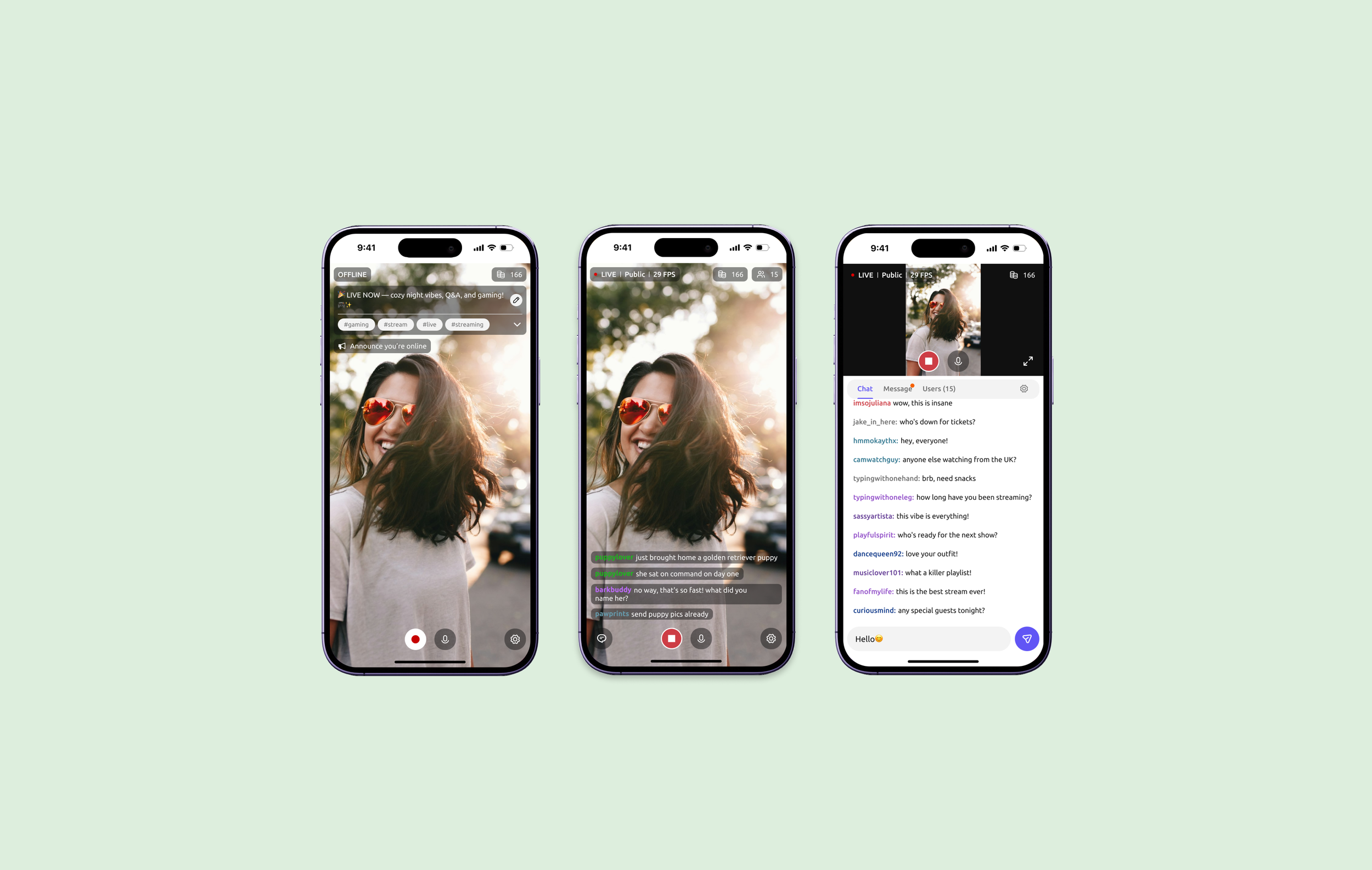
I led the end-to-end redesign of the mobile experience, bringing core broadcasting capabilities to mobile while rethinking them for an on-the-go, one-handed context. The new experience introduced portrait streaming, live chat and controls, and stream settings—all designed to keep creators in control while staying on camera.
Shipped in stages across iOS and Android, the redesign contributed to 27% growth in mobile creators since release.
NDA — Visuals have been recolored and altered to respect confidentiality. The design decisions described here are unchanged.
Role
Lead Product Designer
Timeline
2025 - 2026, shipped in stages
Team
Product Manager, Engineering Team, Product Designer
Status
Fully released on iOS & Android
The Gap
Creators could be seen from a phone. They could not perform from one.
They could go live, but that was about it. There was no way to respond to chat, no access to stream settings once live, and broadcasting was limited to landscape mode. The experience made it possible to stream from a phone, but not to fully manage a live show from one.
As more creators turned to mobile, that gap became harder to ignore: the device offering the most flexibility had the least capable broadcasting experience.
Research
What was getting in creators’ way?
Creator feedback helped me identify where the mobile experience was breaking down. I paired those pain points with a competitive analysis of six live-streaming platforms to understand how others supported creators during a live broadcast and where there was still room to do better.
CREATOR FEEDBACK
Identify the friction
“The mobile broadcasting experience is extremely difficult to navigate.”
“I don't like the landscape layout, i can't see the entire chat and my recording at the same time.”
“I have a lot of trouble chatting in mobile broadcast, as well as setting room title + managing apps in mobile”
The pattern: Creators weren’t struggling to start a stream—they were struggling to manage one once it was live.
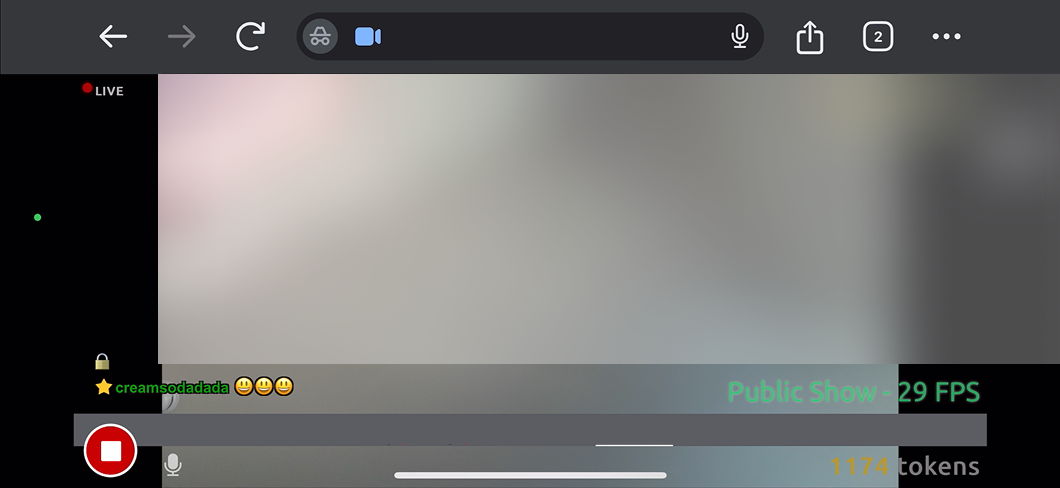
Before: Creators could start and stop a stream, but had little control once live. Chat was view-only, settings were inaccessible, and the experience was landscape-only.
COMPETITIVE ANALYSIS
Understand the interaction cost
I compared six live-streaming platforms through one question: How much does a creator have to interrupt what they’re doing to interact with their audience?
Three tiers of reply cost
I walked through Twitch, TikTok, BIGO, LiveMe, Coco, and Redbook as a broadcasting creator trying to reply to a viewer. Three patterns emerged—not based on feature depth, but on how far a creator had to travel from the broadcast to respond.
One tap
BIGO, Coco
A message button sits on the broadcast itself and opens the input directly.
Behind a panel
Twitch
Chat is read-only on the default view; replying means opening a separate management view first.
Buried in a menu
LiveMe, Redbook, Douyin
The entry point lives inside a menu, several steps away from the broadcast.
Key insight
Every extra step to reply came at the cost of creator attention. But reducing steps also reduced control—the fastest experiences were often the shallowest.
The opportunity was to balance both: lightweight access with enough depth to manage the conversation.
Fast to reach, deep enough to stay useful.
Screenshot of competitive analysis
Three problems, one question
Creators could follow the conversation, but couldn’t join it.
The controls they needed to manage a broadcast lived on desktop.
Anything added to the screen competed with the creator for attention, because the creator is the content.
How might we bring full broadcast control to mobile without getting in the creator’s way?
The Solutions
01 What earns a place on a small screen
Desktop had room for everything. A phone doesn't. So instead of copying the feature set across, I ranked it. I used one test: would a creator reach for this while the camera is on them?
I divided the existing scope into two layers: Primary and Secondary. Primary includes features creators commonly use while their camera is on, while Secondary covers features used less frequently during streams.
PRIMARY LAYER (Pre-Stream)
Stream status
Room subject
Room tags
Stream controls
Token count
Mute/Unmute
Announcement
Settings
PRIMARY LAYER (During Stream)
Stream status
Stream controls
Token count
Viewer count
Chat
Mute/Unmute
SECONDARY LAYER
Room subject
Room tags
Announcement
Microphone
Resolution
2.Where I put the controls in portrait
02 Where I put the controls in portrait
Portrait wasn't a narrower landscape. In portrait the creator fills the frame, so every control I added took space away from them.
I put everything the creator operates in the lower third, within thumb reach, and everything they only read at the top edge or in a corner, clear of their face. The positions change between orientations, but the rule doesn't — controls low, information high — so switching never surprises anyone.
The hard case was the keyboard. Replying to chat takes half the screen, so instead of letting it cover the broadcast, I shrank the video to keep it fully visible.
Most apps assume the user is looking at the interface. A broadcast panel has to assume the opposite: the creator is on camera, and every interaction is visible to an audience.
That led me to a simple rule that shaped nearly every interaction pattern:
The Core Rule
The creator never loses sight of themselves.
So I opened chat as a split view, keeping the video smaller but anchored in a fixed position. I turned every action sheet into a drawer, and removed modals entirely while the stream is live.
Video stays visible in every state.
Other cases to consider:
A modal takes over the center of the screen—and the center of the screen is where the performance happens.
Before the stream starts, I use modals freely. There’s no audience yet, so a modal is exactly the right pattern: the creator is preparing, not performing.
The rule was never “avoid modals.” It was: never take the creator away from the camera while they’re live.
Use modals before streaming, when the creator is still preparing. Once the stream is live, keep the video visible and unobstructed.
The Results
Mobile Creators
33.5k → 42.6k +27%
After mobile stream fully released in December 2025. The number of creators broadcasting from mobile grew from 33,500 to 42,600 so far.
At a creator event shortly after launch, with around 150 people in the room, visibly more of them were going live from phones than before — and several said the same thing unprompted: mobile had stopped being the fallback.
What I Would Change
Putting controls in the lower third keeps them in thumb reach, but it asks creators to frame themselves higher than they naturally would — a cost I'd rather revisit than accept.
The redesign shipped in stages, and mobile still lacks things desktop takes for granted; managing viewers and followers mid-stream is the clearest gap. We're researching which of those belong on a phone at all, rather than porting them by default.